|
 Course Title: AP Agility Solution Developer Course Title: AP Agility Solution Developer
Course ID and Course P/N: APA-TRN-RSENGV-000
Estimated Completion: Self-paced study 10.5 Hours ● Lab Activities 14 to 20 Hours
Skill Level: Intermediate
Description: This course will prepare the Solution Developer with the knowledge and skills needed to configure, implement, and integrate AP Agility to:
- Automate invoice extraction, validation, and accounts payable processing, to provide efficient and accurate invoice reconciliation
- Extend the AP Agility Invoice Processing into Accounts Payable workflow for Invoice Coding, Approvals, Exception handling etc.
Components:
- AP Agility 2.5 Solution Developer for Invoice Processing
- AP Agility 2.3 Solution Developer for Accounts Payable (The training content will work with AP Agility 2.5)
- Analytics for AP Agility (Optional)
Objectives: Upon completion of this course, the learner will be able to:
Invoice Processing
- Complete the implementation and test of the AP Agility invoice processing solution including:
- Access AP Agility Workspace and configure Global Settings
- Configure Export options, an ERP Connection, Invoice Number Validation, Company Code Validation, PO Number Validation, Intercompany Invoices, Units of Measure, Tax settings
- Create an Organization and associated Business Units
- Run a Data Import, Test AP Agility and modify Capture Profile Settings
- Examine Online Learning
- Understand Line Pairing, Line Pairing Correction and 3-way Matching, handling Miscellaneous Charges. and Exception Handling.
- Understand Invalid Reasons how to add/modify them
- Configure VAT Compliancy
- Configure Upgrade scenarios and Customizations
- Test AP Agility Invoice Processing workflow
Accounts Payable
- Complete the implementation and test of the AP Agility accounts payable solution including:
- Review AP Agility architecture and components required for the Accounts Payable Workflow
- Create a GL Account Structure
- Update an Organization to use a GL Account Structure and extend into to Accounts Payable workflow
- Manage Resources via Business Units and Role Assignment for the various manual activities in the Accounts Payable Workflow
- Configure an Approval Hierarchy
- Test Account Payable workflows
- Examine options for PO and Credit Invoices
- Examine Email Invoice Approval and Email Notifications
- Understand the relevant processes for Workflow Customizations and future upgrade considerations
- Install Analytics for AP Agility and walk through the different dashboards, views and charts
Target Audience: Technical personnel who need to know how to implement the AP Agility solution.
Prerequisites: Basic knowledge or experience with TotalAgility is recommended.
Lab Environment Required:
- Invoice Processing training requires a clean TotalAgility system (Cloud or On-premise) with AP Agility installed and configured to meet the prerequisites for the training.
- Accounts Payable training requires a training environment with all of the labs from the Invoice Processing completed.
Lab environment options:
- Build your own on-premise or cloud environment. (TotalAgility installation is not covered in this training.)
- Save the time by renting a lab-ready training environment. (Purchase option available within the course)
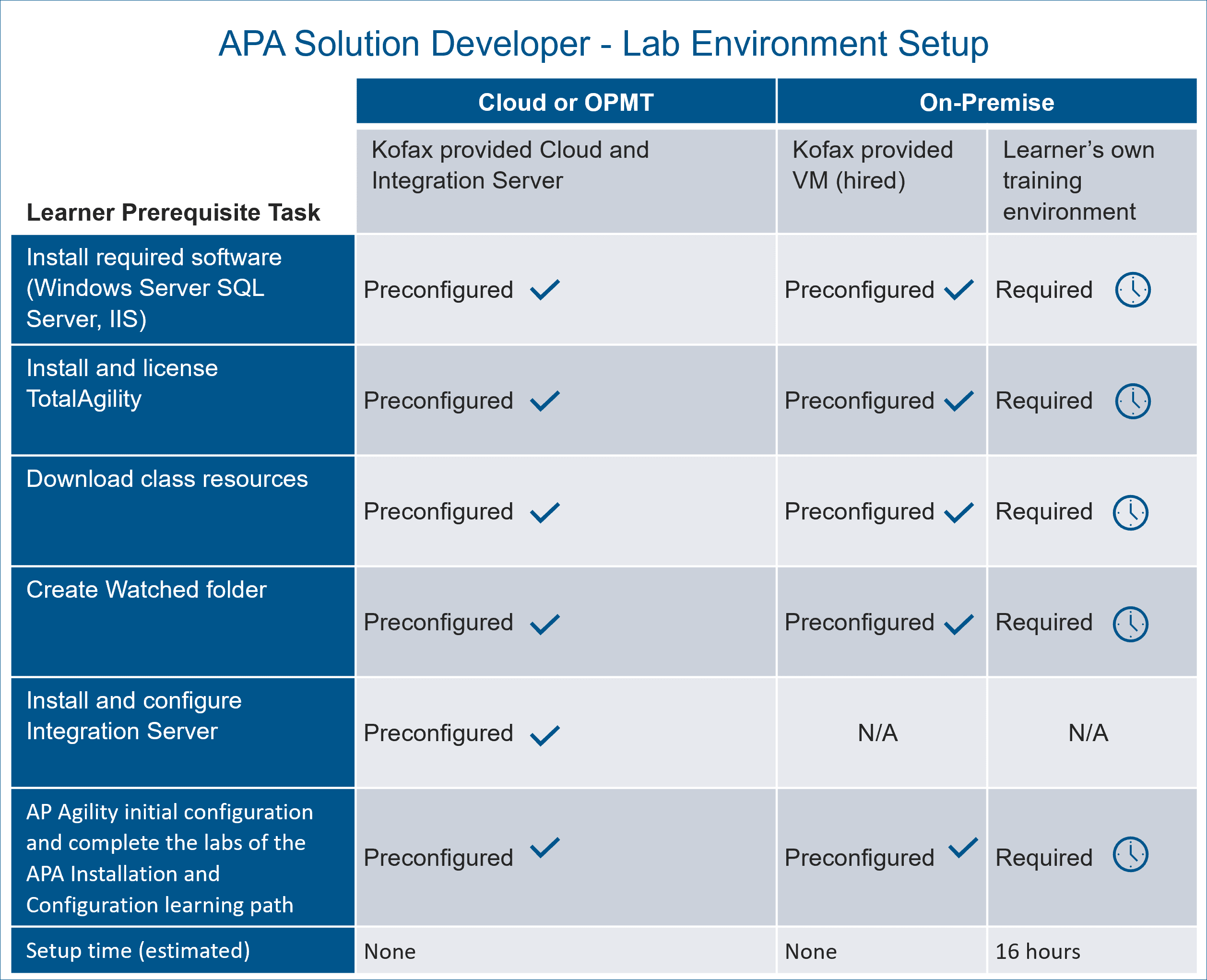
Estimated times needed for building a training environment.
Course Access: 365 days from enrollment date.
Training Components
Click on the course topics below to learn more.
Note: The modules in this training component reference AP Agility 2.3. However, the content is appropriate and accurate for AP Agility 2.5.
Goal: This learning is intended to prepare you to configure and extend Kofax AP Agility to automate Accounts Payable Processing. Learning is accomplished through presentations, demonstrations, and hands-on labs.
Audience: End Users, Partners and Kofax employees responsible for the configuration, support and maintenance of a Kofax Accounts Payable solution, in particular extending into Accounts Payable workflow for Invoice Coding, Approvals, Exception handling etc.
Prerequisites: To get the most from this class, trainees should have:
-
- Completion of the AP Agility 2.3 for Invoice Processing Course and Certification
- Basic working knowledge of:
- SQL databases
- Microsoft Internet Information Services (IIS) Manager
- Invoice and Accounts Payable Processing Concepts
Objectives: Upon completion of this course, students will be able to:
- Review AP Agility architecture and components required for the Accounts Payable Workflow
- Create a GL Account Structure
- Update an Organization to use a GL Account Structure and extend into to Accounts Payable workflow
- Manage Resources via Business Units and Role Assignment for the various manual activities in the Accounts Payable Workflow
- Configure an Approval Hierarchy
- Test Account Payable workflows for:
- Non-PO Invoices
- Duplicates
- GL Coding Requirements
- Exceptions processing
- Approvals and Comment Requests
- Examine options for PO and Credit Invoices
- Examine Email Invoice Approval and Email Notifications
- Understand the relevant processes for Workflow Customizations and future upgrade considerations
- Install Analytics for AP Agility and walk through the different dashboards, views and charts
- Optional topics include:
- Configure Templates and Skins for export where you need to connect to a different ECM system for each Organization
- Configure export to ECM Systems via CMIS (Content Management Interoperability Service)
- Pass a Certification Examination with a score of 85% or higher
Training component modules and exams Introducing Kofax AP Agility for Accounts Payable [14 Minutes] Introducing Kofax AP Agility for Accounts Payable [14 Minutes]- GL Account Segment Structure Creation [22 Minutes]
- Modify Organizations and Business Units [29 Minutes]
- Create Resources and Assign Roles [52 Minutes]
- ERP Master Data and Job Schedules [38 Minutes]
- Test Accounts Payable Workflows [102 Minutes]
- Email Invoice Approval and Email Notifications [56 Minutes]
- Customize Accounts Payable Workflow [53 Minutes]
- Enterprise Content Management (ECM) Integration [11 Minutes]
- AP Agility for AP | Troubleshooting [14 Minutes]
- The AP Agility Workspace and Licensing [21 Minutes]
 AP Agility 2.5 for Accounts Payable Skill Exam AP Agility 2.5 for Accounts Payable Skill Exam
This module covers AP Agility Analytics features, functions, and operations.
Note: This content has been created as part of the AP Agility 2.3 for Accounts Payable course. However, Analytics can be used on all AP Agility workflows, including Invoice Processing. The presentation/demonstrations were recorded at the end of the Accounts Payable learning.
Module Objectives:
- Describe:
- The function, architecture, and operation of AP Agility Analytics
- How the solution is installed and configured
- The purpose and features of the Dashboards and reporting
- Install and Analytics for AP Agility project
- Perform data load
- Navigate the Dashboards and reports
Module Prerequisites:
- Complete AP Agility for Invoice Processing or AP Agility for Accounts Payable training.
Practice Prerequisites:
- Kofax Insight 6.2.0 or later with license installed
- Kofax TotalAgility 7.7.0 or later
- AP Agility 2.3
Training component modules and exams- AP Agility | Analytics [200 Minutes]
Legacy Training Components
The following components cover previous product versions and are included in the course.
Goal: This learning is intended to prepare you to configure and extend Kofax AP Agility to automate Accounts Payable Processing. Learning is accomplished through presentations, demonstrations, and hands-on labs.
Audience: End Users, Partners and Kofax employees responsible for the configuration, support and maintenance of a Kofax Accounts Payable solution, in particular extending into Accounts Payable workflow for Invoice Coding, Approvals, Exception handling etc.
Prerequisites: To get the most from this class, trainees should have:
-
- Completion of the AP Agility 2.3 for Invoice Processing Course and Certification
- Basic working knowledge of:
- SQL databases
- Microsoft Internet Information Services (IIS) Manager
- Invoice and Accounts Payable Processing Concepts
Objectives: Upon completion of this course, students will be able to:
- Review AP Agility architecture and components required for the Accounts Payable Workflow
- Create a GL Account Structure
- Update an Organization to use a GL Account Structure and extend into to Accounts Payable workflow
- Manage Resources via Business Units and Role Assignment for the various manual activities in the Accounts Payable Workflow
- Configure an Approval Hierarchy
- Test Account Payable workflows for:
- Non-PO Invoices
- Duplicates
- GL Coding Requirements
- Exceptions processing
- Approvals and Comment Requests
- Examine options for PO and Credit Invoices
- Examine Email Invoice Approval and Email Notifications
- Understand the relevant processes for Workflow Customizations and future upgrade considerations
- Install Analytics for AP Agility and walk through the different dashboards, views and charts
- Optional topics include:
- Configure Templates and Skins for export where you need to connect to a different ECM system for each Organization
- Configure export to ECM Systems via CMIS (Content Management Interoperability Service)
- Pass a Certification Examination with a score of 85% or higher
Training component modules and exams- Introducing Kofax AP Agility for Accounts Payable [14 Minutes]
- GL Account Segment Structure Creation [22 Minutes]
- Modify Organizations and Business Units [29 Minutes]
- Create Resources and Assign Roles [52 Minutes]
- ERP Master Data and Job Schedules [38 Minutes]
- Test Accounts Payable Workflows [102 Minutes]
- Email Invoice Approval and Email Notifications [56 Minutes]
- Customize Accounts Payable Workflow [53 Minutes]
- Enterprise Content Management (ECM) Integration [11 Minutes]
- AP Agility for AP | Troubleshooting [14 Minutes]
- The AP Agility Workspace and Licensing [21 Minutes]
- AP Agility 2.3 for Accounts Payable Skill Exam
|